

Have you ever sat down for a good sweat and thought, “Can I bring my kindle in a sauna?”
I get it. Reading feels like the perfect sauna companion.
But the short answer is: it’s risky. Most Kindle models are happiest at about 95°F or below, while a traditional sauna can cruise well past 150°F, and that kind of extreme heat can lead to battery damage and screen problems.
Steam and high humidity raise the stakes too, because moisture can sneak into ports and seals even if you think you’re being careful.
I’ve used saunas since 2012, and I founded SaunaCloud in San Francisco in 2014, so I’ve seen what heat exposure can do to electronics. I also wrote The Definitive Guide to Infrared Saunas in 2015, and I’ll keep this practical for sauna buyers who want clear, safe options.
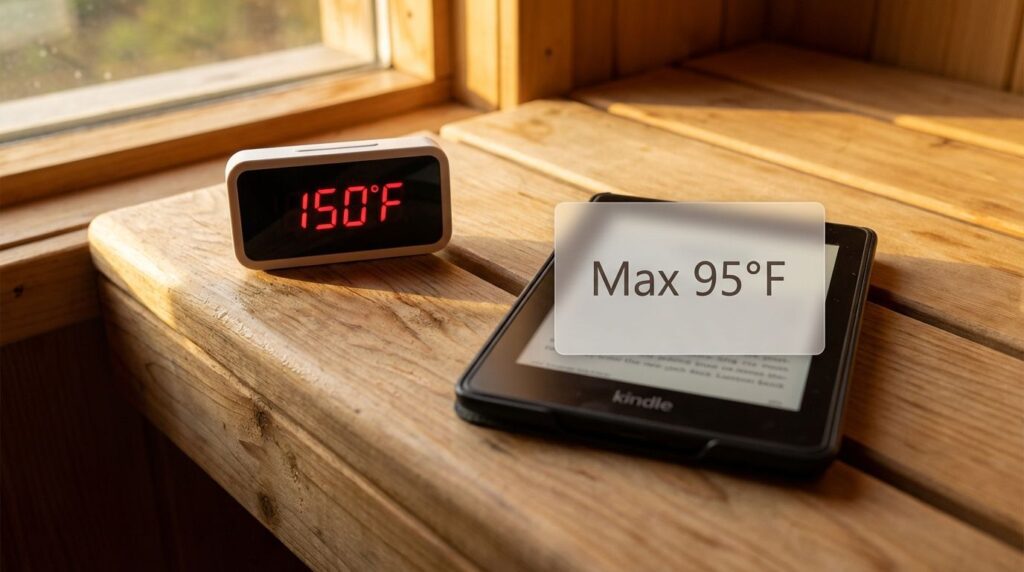
I’ll walk you through what can go wrong, how to reduce risk if you insist on bringing a device, and better alternatives like audio books and compact books.
Risks of Bringing a Kindle Into a Sauna
A sauna is tough on electronics for two reasons: temperature and moisture. Even if your Kindle never gets splashed, hot air can push the battery and adhesives past their comfort zone.
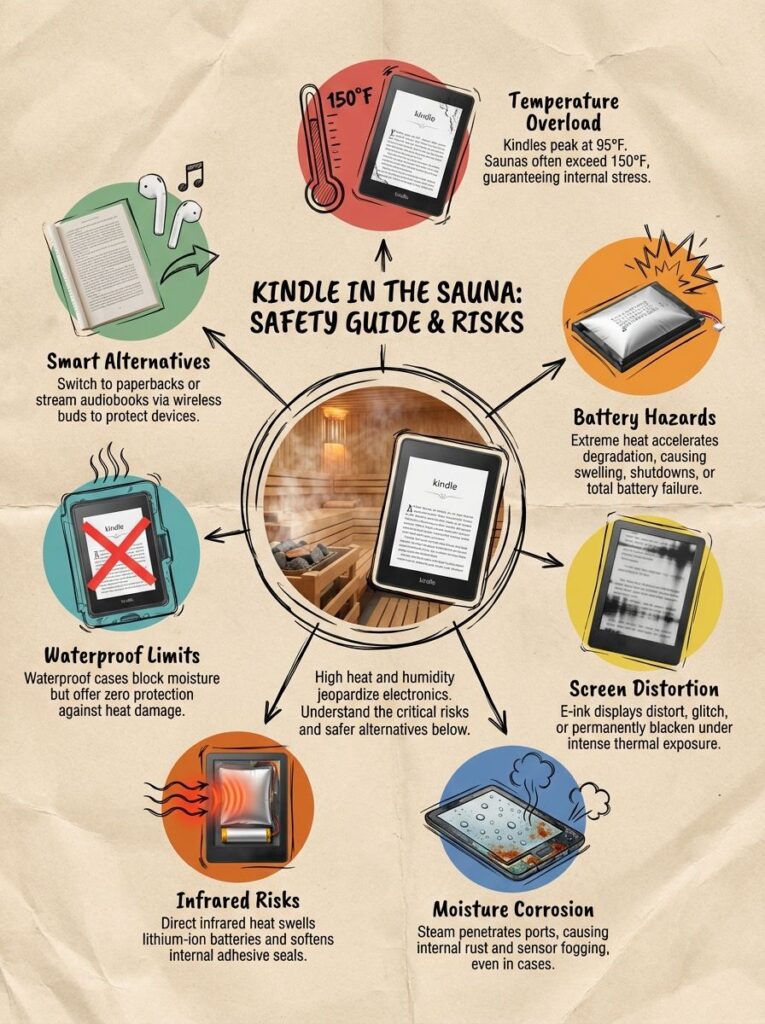
If you’re shopping for a sauna or dialing in how you’ll use one at home, it helps to think in “zones.” The top bench and the area near the heater are where devices fail first.
- Heat stress: overheating, shutdowns, long-term battery wear, warped plastics.
- Moisture stress: condensation, corrosion in ports, screen haze that can linger.
- Heater proximity: radiant heat from the heater can be harsher than the room average.
- Hot surfaces: a bench can conduct heat into the device faster than air can.
- Thermal shock: moving a hot device into cool air can create internal condensation.
How does heat affect my Kindle in a sauna?
The core problem is that a Kindle is built for “normal life,” not sauna life. Amazon’s Kindle Paperwhite user guide, for example, lists an operating temperature of 32°F to 95°F (0°C to 35°C).
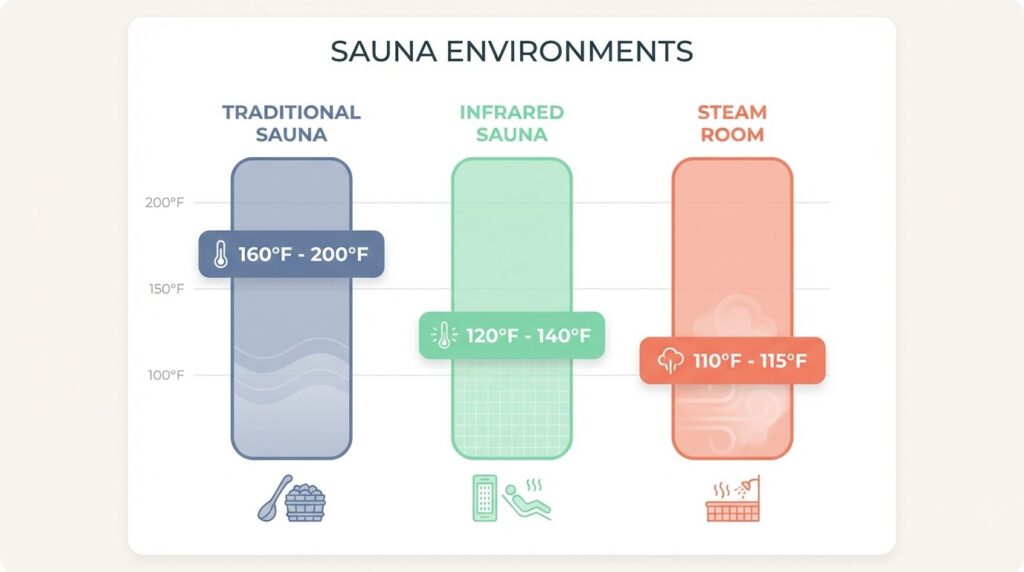
That makes sauna heat exposure a gamble, especially in finnish saunas and other high-heat rooms. Many sauna guides put traditional sauna air roughly in the 160°F to 200°F range, and you can see why this gets risky fast.
| Environment | What it feels like for a Kindle | What to do instead |
|---|---|---|
| Traditional sauna (dry or with water on rocks) | Often far above the operating range | Keep the Kindle outside, use audio books, or bring a paperback |
| Infrared sauna | Lower air temps, but panels and dark surfaces can still heat the device quickly | If you must, limit time and keep it low, away from panels |
| Steam room | Moisture risk is high even at lower temps | Skip electronics, use audio outside the room |
If you want to double-check your own setup, do a quick thermometer check at the exact height and spot where you would hold the device. Don’t trust a thermostat that’s mounted high on the wall, heat rises and that number may not match your bench.
People often cite the Kindle safe range as topping out at 35°C (95°F), and it’s a good reminder that “it worked once” isn’t the same as “it’s safe long-term.”
Heat also stacks up in sneaky ways. A thick cover can trap heat against the back of the Kindle, and placing it on a hot bench can cook it faster than holding it in your hands.
Many finnish saunas hit 120 to 140°F at milder settings, and plenty run hotter than that depending on the heater, the benches, and how much water hits the stones.
E-ink displays can also misbehave in high heat. You might see slow refreshes, darker patches, or strange ghosting after a hot session.
Waterproof e-readers and water-resistant covers help with steam, but they don’t stop heat-driven battery wear. If reading matters to you during sessions, audio books or compact books are the safer move.
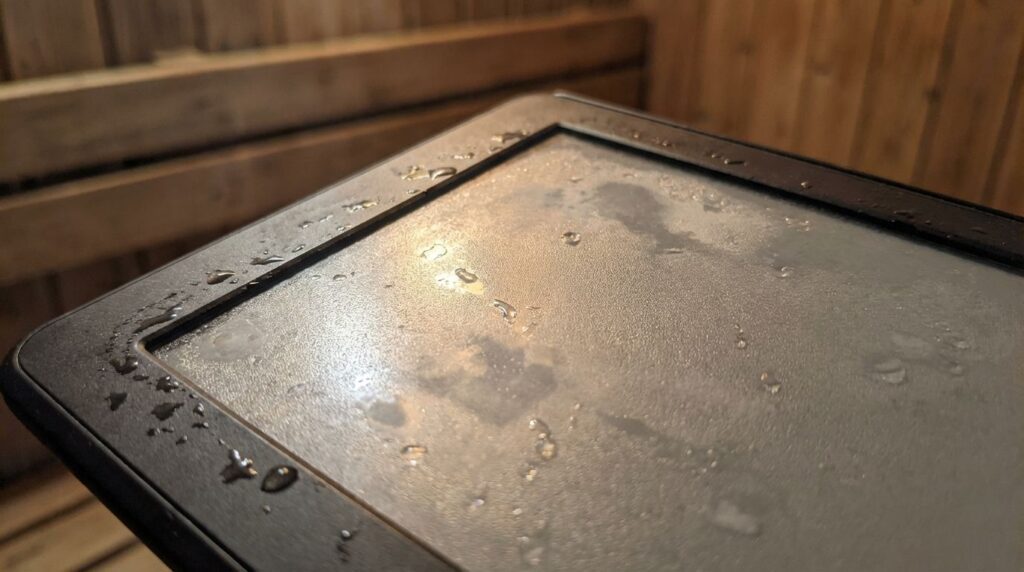
Don’t roast your reader, treat it like sunscreen for electronics.
Can humidity and moisture damage my Kindle?
Yes, and the tricky part is that moisture damage doesn’t always show up the same day. Steam can get into charging ports, speaker holes, and tiny gaps around buttons, then sit there as condensation.
In a dry sauna (no water on rocks), humidity can be very low. Once you start throwing water for löyly, humidity can spike, then fall again as the air heats back up, and those swings can drive moisture into places you don’t want it.
Steam rooms are a different animal. Many steam system makers describe steam rooms as running around 110°F to 115°F with about 100% humidity, which is why electronics hate them even if the air temperature sounds “not that hot.”
- Port corrosion: moisture in the USB port can corrode contacts over time.
- Screen haze: condensation can create a foggy look that may not fully clear.
- Hidden moisture: a powered-off device can still trap water inside as it cools.
- Skincare side effect: if you keep skincare wipes or products near the device, steam can make a messy mix of residue and moisture around ports and seams.
A ziplock bag with silica gel or silica gel packs can help lower moisture exposure during a session. Just be honest about the limit: it reduces humidity contact, it does not prevent heat exposure.
If you want the lowest-risk habit, keep the Kindle outside the room and bring your audio in through a speaker or earbuds that stay outside the hot zone.
Impact of Sauna Conditions on Electronic Devices
Sauna heat stresses batteries, plastics, adhesives, and seals all at once. Steam can fog sensors, corrode ports, and soften adhesives that hold screens and layers together.
From a design standpoint, this is why I tell sauna buyers to plan a “device-safe spot” near the sauna, like a small shelf outside the door, instead of trying to make a reading nook inside the hottest room.
- Heat rises: higher benches and head-height air are hotter than lap-height air.
- Radiant heat is real: heaters and infrared panels can warm objects faster than you expect.
- Moisture moves: condensation finds ports, then corrosion follows.
- Cooling changes everything: quick temperature changes can pull moisture inside a device.
How does sauna heat cause battery degradation?
Heat in a sauna speeds chemical reactions inside Li-ion cells, so the battery wears out much faster at sauna temperatures than it does at room temperature.
High heat can also raise internal pressure, which is where swelling and “my battery suddenly got worse” stories start. Research on high-temperature aging of lithium-ion batteries shows faster capacity loss and rising internal resistance as temperatures climb.
The most practical tip is also the easiest: never charge a device during or right after a sauna session. Charging creates extra heat inside the battery, and you don’t want to stack heat on top of heat.
- Finish your session, then let the Kindle cool down in a dry area.
- Keep it out of direct radiant heat from the heater or infrared panels.
- If you used a sealed bag, crack it open once you’re in a dry place so trapped humidity can escape.
- Wait until the device feels normal to the touch before you plug it in.
Infrared vs. Traditional Saunas: Does the type of heat change the risk?
Yes, the type of sauna changes the risk profile, but it doesn’t make a Kindle “safe.” Traditional rooms usually run hotter air temps, while infrared cabins run cooler air temps but can still heat objects quickly through radiant energy.
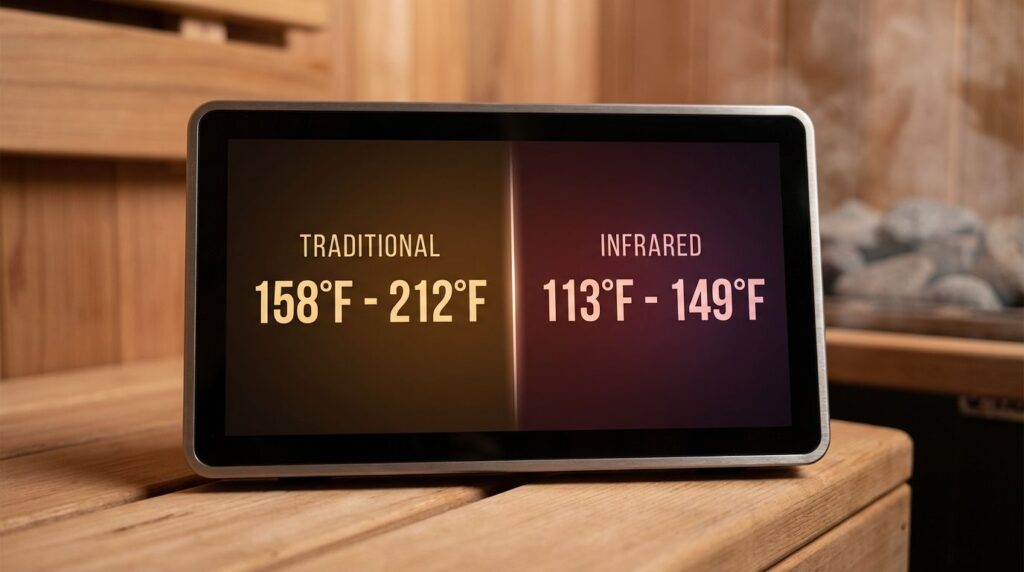
Many sauna guides describe a traditional sauna around 70°C to 100°C (158°F to 212°F), while infrared sessions often live closer to 45°C to 65°C (113°F to 149°F). Either way, you can still be over the Kindle’s comfort zone.
In my own builds, I use a thermometer to check real bench temperatures. I’ve also seen lithium-ion batteries swell after short exposures in hot environments, especially when people set devices down on benches or close to heaters.
- If you own a traditional sauna: assume the room is too hot for a Kindle and plan a device shelf outside the door.
- If you own an infrared sauna: treat it as “lower risk, not low risk,” and keep electronics away from panels and heaters.
- If you alternate hot and cold: avoid taking a hot device into cold air fast, that’s how condensation forms.
Moisture and heat both threaten e-readers, even waterproof models. Waterproof e-readers can handle splashes better than older devices, but they still aren’t built for sauna heat and steam.
If you’re an infrared sauna buyer and you want safer session habits, my infrared sauna tips walk through comfort, pacing, and how to set up your space without turning it into an electronics test lab.
What damage can sauna conditions cause to the screen and internal parts?
High heat can blacken or distort a Kindle screen, and you may notice slower page turns or weird dark patches that don’t fully go away. I once left my Kindle on the bench during a 140°F infrared session, and the display later showed dark spots and sluggish refresh.
Industrial e-paper suppliers often rate standard e-paper panels to operate up to about 50°C (122°F), but a consumer e-reader still has a battery, adhesives, seals, and plastics that can be less forgiving.
- Screen issues: blotches, ghosting, slow refresh, delamination.
- Port issues: corrosion, charging failures, “moisture detected” style problems.
- Internal issues: warping, short-circuiting from heat plus moisture over time.
If you want a simple rule that saves devices: don’t set a Kindle on a hot bench, and don’t leave it in the sauna between rounds. That’s when the heat soak really ramps up.
Safer Alternatives to Using a Kindle in a Sauna
If you want to protect your electronics and still enjoy content, the best move is to separate the “content” from the “device.” Keep devices in cooler air, then bring the experience into the sauna in a safer format.
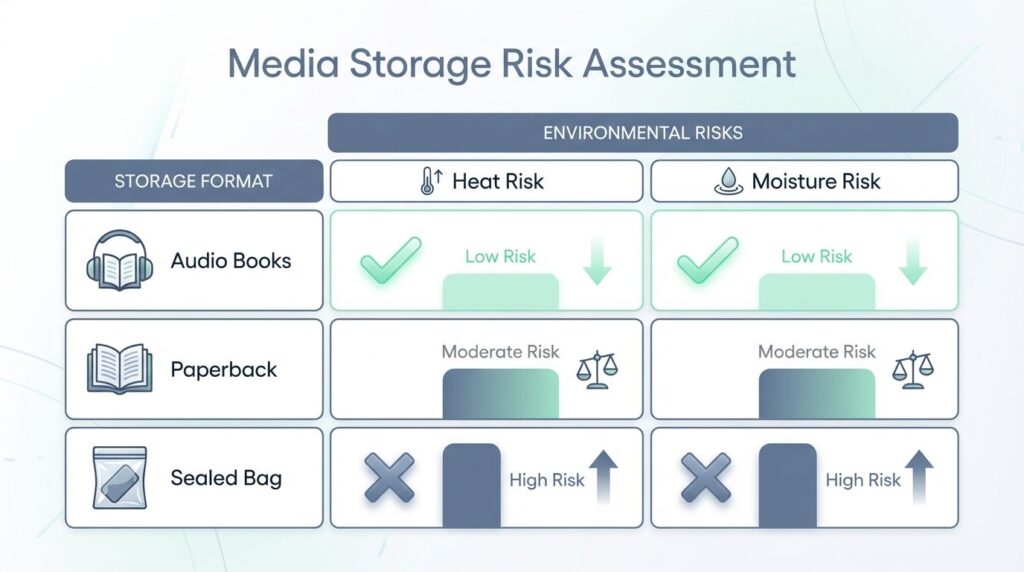
Here are options that work well for sauna buyers setting up a routine at home.
| Option | Heat risk | Moisture risk | Best use |
|---|---|---|---|
| Audio books (device stays outside) | Low | Low | Most people who want hands-free sessions |
| Paperback or compact books | Low | Medium | Dry sauna sessions, shorter reads |
| Kindle in a sealed bag with silica gel packs | High | Lower than unprotected | Only if you accept the risk |
Can a waterproof case protect my Kindle in a sauna?
Waterproof cases and water-resistant sleeves can help with steam and sweat, especially if they cover the charging port. If you already own a case, a thin silicone-style shell usually traps less heat than a thick folio.
The catch is heat. A case can act like insulation, holding warmth against the back of the device and making overheating more likely.
- Use a simple, thin case, skip bulky covers that trap heat.
- Keep the device low on your lap, not up near the hottest air layer.
- Never place it on the bench, use a towel as a buffer if you must set it down.
- If you use a sealed bag, add silica gel packs, and replace them when they stop feeling dry.
I’ve seen devices fail from high temperatures even when they stayed dry, so I treat cases as a moisture tool, not a heat solution.
Is listening to audiobooks better than using a Kindle in a sauna?
For most sauna buyers, yes. Audio books let you keep the device in a safe spot outside the sauna, which takes heat exposure and humidity out of the equation.
My favorite setup is simple: pre-download your audiobook or podcast, keep your phone outside the hot room, and pipe the sound in with a small speaker or earbuds that stay out of the hottest zone.
- Download your audio before the session so you’re not fighting Wi‑Fi in a steamy space.
- Keep the phone outside the door, on a shelf, or in a cooler adjacent room.
- If you use a speaker, keep it out of direct line-of-sight to the heater and away from splashes.
- If you want quiet sessions, try one earbud, so you can still hear your body and your breathing.
This is also a nice neck-saver, you aren’t craning your head forward to stare at a screen while you relax.
Should I bring a paperback book instead of a Kindle into a sauna?
A paperback is the old-school winner for sauna reading. No battery, no screen, no circuits.
If you want books that hold up best, I’ve had the best luck with compact books, cheap paperbacks you won’t cry over, and anything with thicker covers.
- Laminated pages or coated pages resist moisture better than standard paper.
- Bring shorter reads (poetry, essays, short stories) that fit one session.
- Keep the book in a ziplock bag between rounds to reduce humidity soak.
- If the sauna is very humid, accept a little warping, or switch to audio.

The Bottom Line on Saunas and Kindles
Using a kindle in a sauna is not recommended because extreme heat and humidity can damage batteries and screens.
Heat is usually the bigger threat than moisture, even with water-resistant models and waterproof cases.
If you want a safer routine, keep the device outside and use audio books or bring a paperback into the sauna. If you absolutely must bring a device, use a thermometer, keep it far from the heater, avoid steam, and let it cool down fully before you charge it.
At SaunaCloud, we believe your sauna should be a place for total relaxation, not a place where you’re worried about frying your electronics. We specialize in high-quality infrared technology designed for longevity and comfort. If you are looking for the right sauna for your home or have questions about how to safely enjoy your sessions, I’m here to help. I’m Christopher Kiggins, and you can reach me directly at 800-370-0820 with any questions.
People Also Ask
Not really, high heat and steam can damage a Kindle’s battery and screen.
The battery and the display take the worst hit. Moisture can cause short circuits, and heat can swell the power cell.
Yes, it can void the warranty, many manufacturers warn against extreme temperature and moisture. Fire is rare, but a swollen battery can be dangerous, so don’t take chances.
For battery & screen safety, keep the device in a sealed bag, avoid direct steam, and let it cool before you turn it on. If you read in heat often, use a waterproof, heat-rated gadget, or step outside the steam room.